


Veebs
1.9289.00 Reviews
App Specs
- Version
- 26.1.13
- Updated On
- License
- Free
- Downloads
- 10,000+
- Developer
- VBS CORP LLC
- Categories
- Shopping
- Platform
- Android
Screenshots
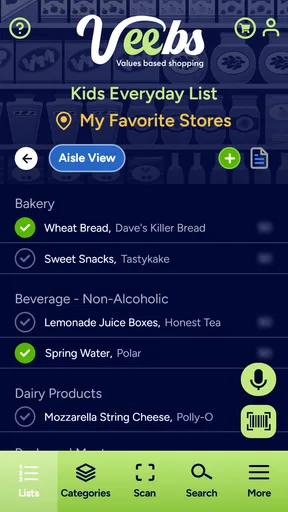
 Analysis by AppCompare
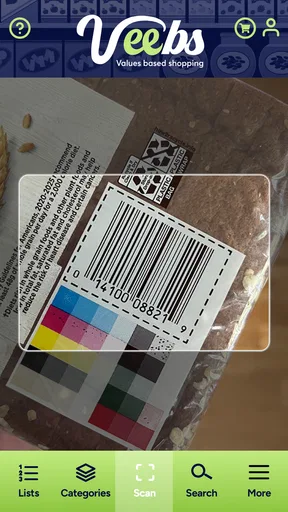
I would approach Veebs as a practical grocery companion, not as an all-purpose productivity or privacy tool. It is a shopping app built around grocery shopping and scanning, so the useful question is whether it fits the way you choose products and move through a store. If you often pause to check what you are buying, having a scanning-focused app in that routine may be worthwhile; if you only need a quick list, a simpler notes app may suit you better.
What to expect from a grocery-scanning app
The first thing I would keep in mind is that a scanner is most valuable when it helps answer a specific shopping question. Before opening the app, decide what you want to learn from scanning an item: perhaps you are comparing options, checking a product as part of your usual shop, or trying to make a more considered choice. That small bit of purpose makes the experience less like scanning for its own sake.
Veebs is free to download, though it offers in-app purchases priced from $0.99 to $8.99 per item. I would start with the free experience and only consider paying if I found a particular extra useful in my real shopping routine. That avoids spending on an unknown benefit before you have had a chance to see whether the basic idea works for you.
The app is made by VBS CORP LLC and is listed for everyone. It has a 1.9 average from around 390 ratings, alongside roughly 289 written reviews, so I would treat the overall reception as a reason to test it cautiously rather than assume it will be a perfect fit. Ratings do not explain every individual experience, but they are a useful prompt to check whether the app behaves reliably on your own device before building a routine around it.
Set it up around your actual shopping habits
Veebs is an everyday grocery-shopping app, so I would try it at home before relying on it in a busy aisle. Pick a familiar packaged product, open the scanning feature, and see how clear the result is. This is a simple first test: you already know the item, so you can judge whether the app gives you information you can understand and use, rather than trying to learn the interface and make a shopping decision at the same time.
The current version is 26.1.13, and the stated minimum operating system is 11. Before installing, check that your phone meets that requirement. That is especially useful if you keep an older device for shopping or use a phone with limited storage; finding out at home is less frustrating than discovering a compatibility issue when you are already at the store.
For a first visit, I would avoid scanning an entire cart. Try a couple of products you buy regularly and one alternative you have been curious about. Comparing familiar items gives you a practical way to decide whether Veebs adds something to your choices, while keeping the test short enough that it does not slow down your trip.
Worth Reading Before You Choose

Flipboard Shows What News Apps Must Do Beyond the Feed

Switching to Android Auto Means Rethinking Your Driving Routine

Google Calendar Makes a Crowded Week Easier to Manage

Ludo King Makes the Most of the Minutes Between Plans

Baby Panda World Brings Quick Play to Modern Phones, but Its Game Library Feels Busy

ESPN’s Live Game View Makes Following Close Games Easier
Turn the first scan into a useful decision
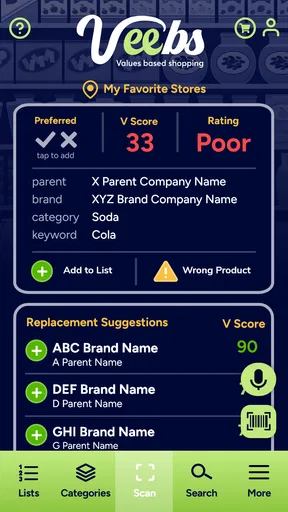
A good first success is not simply getting a scan to run; it is using what appears to make a choice you feel comfortable with. For example, if you are deciding between two pantry staples, scan them one at a time and read the results before putting either in your basket. If the information helps you choose, you have found a concrete role for the app. If it leaves you uncertain, that is a sign to check the product packaging or use another source rather than treating a scan as the final word.
Scanning can also be more useful when you compare like with like. Try two versions of the same kind of product rather than unrelated groceries, and pay attention to whether the app presents information in a way that helps you make that comparison. This is a modest but worthwhile habit: it keeps your decision focused and helps you notice whether the app is actually changing your shopping process.
One trade-off is speed. A scan adds a step, and doing that for every item can interrupt a quick shop. I would reserve it for products where you have a real question, then shop normally for the rest. That keeps the app in a supporting role instead of turning a grocery run into a sequence of phone checks.
Where it fits—and where it may not
Compared with a basic shopping-list app, Veebs is aimed at the product itself rather than just remembering what to buy. A list app is usually quicker for jotting down milk or bread; a scanner is more relevant when you want to examine a packaged item while shopping. Those tools can complement each other, but Veebs is not automatically a replacement for a list, a store’s own shopping service, or the information printed on a label.
It is a better match for someone who enjoys checking products and is willing to spend a little time doing so. It is less compelling for shoppers who want the fastest route through the store, mainly buy loose produce, or prefer to make decisions from packaging without using a phone. If you shop with limited connectivity or do not want to handle your device in the aisle, test the app at home first and do not assume every part of the experience will suit your routine.
For a realistic trial, imagine your usual weekly shop: you are replacing a cereal you have run out of and considering a different option. Scan the familiar box first, then the alternative, and ask whether the comparison helps you make a decision. If it does, keep Veebs for those moments. If not, you have learned that your usual label check or another shopping tool is enough, without needing to change how you buy everything.
It is also worth deciding in advance how much time you want to spend on product research. A quick scan of one or two items can be a useful pause; repeatedly checking every choice can make shopping feel slower and less relaxed. I would use Veebs selectively, especially for products I buy often or am genuinely reconsidering, and leave routine decisions alone.
Getting Started with Veebs
First things first, downloading and setting up Veebs was a breeze. Available on both Android and iOS, it took just a few taps to get it running on my device. The installation was smooth, and in no time, I was ready to explore what this app had to offer.
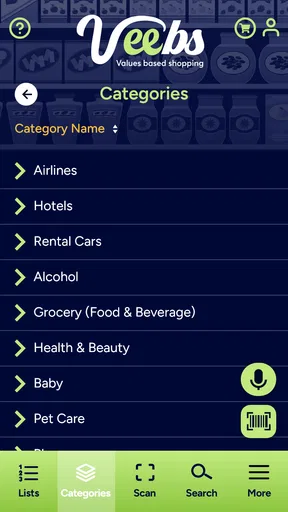
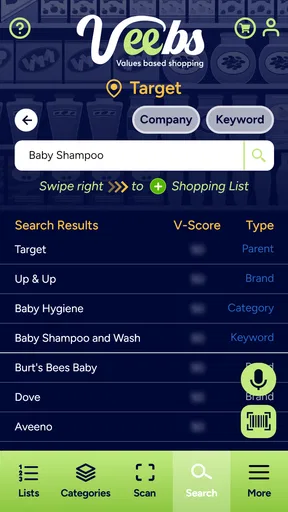
Once you open the app, you're greeted with a clean, user-friendly interface. No complicated menus or overwhelming options. Everything is laid out intuitively, making it easy even for those who aren't particularly tech-savvy. The app's design is sleek and modern, which is always a plus in my book.
Features That Stand Out
Now, let's talk about what makes Veebs a standout app in its category. At its core, Veebs is designed to optimize your digital experience, offering a range of features that cater to different needs.
- Customizable Interface: One of the first things I noticed was how customizable the app is. You can tweak the settings to fit your preferences, which means you're not stuck with a one-size-fits-all solution.
- Efficiency Boost: Veebs includes a suite of tools that promise to enhance productivity. Whether it's organizing your tasks, managing your schedule, or just keeping track of your day-to-day activities, this app has got you covered.
- Privacy Features: In today's digital age, privacy is paramount. Veebs takes this seriously, offering robust privacy controls that let you decide what information you want to share and what you want to keep under wraps.
These features are just the tip of the iceberg, and I found myself constantly discovering new things as I continued to use the app.
User Experience: Smooth Sailing
One thing I genuinely appreciated about Veebs is the seamless user experience it offers. Navigating through the app is a breeze, thanks to its intuitive design. The developers clearly put a lot of thought into ensuring that users can make the most out of it without any hassle.
The app runs smoothly, with no noticeable lag or glitches, which is a huge relief when you're juggling multiple tasks or features. I also appreciated the little touches, like the helpful tooltips and guides that pop up when you first start using certain features. It's like having a friendly guide by your side, making sure you get the most out of the app.
Is Veebs Worth It?
Now, the million-dollar question: is Veebs worth downloading? In my opinion, absolutely. Whether you're looking to streamline your workflow, manage your personal life more efficiently, or just want a reliable app that respects your privacy, Veebs ticks all the right boxes.
It's versatile enough to cater to a wide range of users, from busy professionals to students and everyone in between. The app's ability to adapt to your needs is one of its strongest points, and it's something that sets it apart from many other apps in the market.
So, if you haven't tried Veebs yet, I highly recommend giving it a go. It's one of those apps that once you start using, you'll wonder how you ever managed without it. Plus, with its free download option, you have nothing to lose and plenty to gain.
In conclusion, Veebs is an excellent addition to any smartphone, offering a blend of functionality, customization, and privacy. Whether you're a tech enthusiast or just someone looking for a reliable app to make life a little easier, Veebs is definitely worth checking out. Happy app-ing!
Pros
- Intuitive user interface for easy navigation.
- Customizable settings to suit user preferences.
- Seamless integration with other apps.
- Regular updates with new features.
- Efficient performance with minimal lag.
Cons
- Limited offline functionality.
- In-app purchases may be pricey.
- Occasional bugs in new updates.
- Requires a stable internet connection.
- Some features locked behind paywall.
FAQs for Veebs
What is the primary function of Veebs?
Veebs is a versatile language translation app that allows users to seamlessly translate text, voice, and images into multiple languages. It's designed for travelers, language learners, and anyone needing quick translations on the go. The app supports a wide range of languages and offers both online and offline modes for convenience.
Is Veebs available for both Android and iOS devices?
Yes, Veebs is available for download on both Android and iOS platforms. You can find it on the Google Play Store for Android devices and the Apple App Store for iOS devices. This ensures that you can use Veebs regardless of your device preference, making it accessible to a broader audience.
Does Veebs require an internet connection to function?
Veebs offers both online and offline functionality. While an internet connection enhances the accuracy and speed of translations, the app also allows you to download language packs for offline use. This feature is particularly useful for travelers who might not always have access to the internet.
Are there any subscription fees or in-app purchases in Veebs?
Veebs offers a free version with basic translation features. However, there are subscription options available for users who want to access premium features, such as advanced language packs, ad-free experience, and enhanced translation capabilities. In-app purchases are optional but provide a more comprehensive experience.
How secure is the data I input into Veebs?
Veebs prioritizes user security and data privacy. The app uses encryption to protect your data and ensure that any text, voice, or image translations are securely processed. Additionally, Veebs does not store personal data unnecessarily, adhering to privacy standards and regulations to safeguard user information.


